With the release of Android 17, the Google Pixel has quietly transformed into an audiophile powerhouse by adding native support for the lhdc codec. While previous models relied on Sony's LDAC, the inclusion of Savitech’s LHDC v5 standard unlocks 1Mbps bitrates and ultra-low latency. If you own a Pixel 6 or newer, your smartphone just gained a massive audio boost that bridges the gap between wireless convenience and wired Hi-Fi quality.
Quick Facts
- Max Bitrate: Up to 1 Mbps with LHDC v5, significantly higher than standard Bluetooth.
- Latency: As low as 30ms with LLAC mode, perfect for gaming and video.
- Compatibility: Google Pixel 6, 7, 8, and 9 series running Android 17.
- Certification: Hi-Res Audio Wireless certified by the Japan Audio Society.
- Hardware Requirement: Needs compatible buds like the Nothing Ear (2024) or OnePlus Buds Pro 3.
- Stability: Maintains a 400kbps minimum bitrate even on congested networks.
The lhdc codec on Google Pixel is a high-resolution Bluetooth standard introduced in Android 17 that enables up to 24-bit/192kHz audio streaming at a maximum 1Mbps bitrate. This update makes Pixel devices compatible with high-end third-party earbuds like the OnePlus Buds Pro 3, providing a lower-latency, higher-fidelity alternative to standard AAC.
The High-Res Leap: What LHDC v5 Changes for Pixel
For years, Android enthusiasts have been caught in a bit of a tug-of-war. If you wanted high-resolution wireless audio, you were largely tethered to Sony’s LDAC. While LDAC is excellent, it isn't the only player in town. The introduction of the lhdc codec v5 to the Google Pixel lineup represents a seismic shift in the mobile audio landscape. It moves the Pixel from being a "good enough" audio device to a legitimate piece of Hi-Fi gear.
When we talk about bitrates, the numbers tell a compelling story. Most users are accustomed to the AAC codec, which caps out at approximately 256 kbps, or the aging SBC codec at 328 kbps. In contrast, the LHDC v5 codec introduced to Pixel phones in Android 17 offers a maximum bitrate of up to 1 Mbps. This isn't just a marginal gain; it is a massive expansion of the data pipe, allowing for a 24-bit/192kHz sample rate that preserves the nuances of lossless streaming services like Tidal or Apple Music.
Savitech, the creator of the standard, worked closely with the Japan Audio Society to ensure this protocol meets the rigorous Hi-Res Audio Wireless certification requirements. For Hi-Fi enthusiasts, this means the soundstage feels wider, the instrument separation is sharper, and the digital "sheen" often associated with compressed Bluetooth audio is virtually eliminated. By following the google pixel android 17 hi-res audio settings guide, users can finally bypass the limitations that have held back wireless audio for a decade.
LHDC vs. LDAC: Which Is Better for Your Ears?
The inevitable question for any audiophile is: how does this stack up against Sony’s LDAC? Both are high-bitrate codecs, but they handle the realities of the physical world differently. In a laboratory environment, LDAC peaks at 990kbps, while LHDC v5 hits that 1Mbps mark. However, we don't listen to music in labs; we listen in crowded subways, airports, and interference-heavy offices.
One of the most impressive feats of the lhdc codec is its stability under pressure. On congested networks, the LHDC codec resorts to a 400 kbit/s bitrate, which is slightly higher than the 330 kbit/s minimum to which Sony's LDAC codec can resort. This prevents the "stutter" or drop-outs that can ruin a listening session when the 2.4GHz spectrum gets crowded.
Furthermore, there is the issue of bluetooth audio lhdc codec latency. If you use your phone for gaming or watching movies, latency is the enemy. Standard high-resolution codecs like LDAC usually hover around an average latency of 200ms. If you are playing a competitive shooter, that delay is an eternity. The LHDC LL (Low Latency) variant, however, provides a significantly faster response time of 30ms. This makes the Pixel a much more versatile tool for media consumption beyond just music.
| Feature | LDAC | LHDC v5 |
|---|---|---|
| Max Bitrate | 990 kbps | 1000 kbps (1 Mbps) |
| Min Bitrate (Congested) | 330 kbps | 400 kbps |
| Max Resolution | 24-bit/96kHz | 24-bit/192kHz |
| Gaming Latency | ~200ms | ~30ms (LLAC mode) |
| Stability | Variable | Dynamic Bitrate Scaling |
When performing an lhdc v5 vs ldac sound quality comparison, the differences often come down to the specific hardware pairing, but LHDC generally offers a more modern, efficient approach to data packet management.

Hardware Matchmaking: Choosing the Best Earbuds
There is a slight irony in this update: Google’s own flagship earbuds, the Pixel Buds Pro 2, do not currently support the lhdc codec. They rely primarily on Opus and AAC. To truly unlock the audiophile potential of your Pixel running Android 17, you need to look at the broader ecosystem of lhdc 5.0 supported devices.
The most popular choices currently come from the OnePlus and Nothing stables. The OnePlus Buds Pro series significantly benefits from this update. When paired with a Pixel 9 Pro XL, the OnePlus Buds Pro 3 can finally stretch their legs, delivering the full 24-bit/96kHz experience they were designed for. Similarly, the Nothing Ear (2024) models are fantastic best earbuds for pixel lhdc 5.0 support, offering a crisp, detailed sound signature that shines when the 1Mbps pipe is open.
If you are a fan of Oppo or Xiaomi’s audio gear, you are also in luck. Many of these brands have used LHDC for years, but Pixel users were previously locked out. By checking a comprehensive list of lhdc 5.0 supported devices google pixel, you can find the hardware that matches your sound preference, whether you want the bass-heavy punch of the OnePlus series or the analytical transparency of Nothing’s flagship buds. Don't forget to use the HeyMelody app or the specific manufacturer's control app to ensure the high-res toggle is active within the buds' firmware itself.

Guide: How to Enable LHDC on Your Google Pixel
Once you have your compatible hardware and your Pixel is updated to Android 17, you might find the option isn't immediately obvious. Unlike standard AAC, high-resolution codecs often require a quick trip into the back-end settings of your phone. Here is how to enable lhdc on google pixel android 17 and get the most out of your audio.
- Unlock Developer Options: Go to Settings > About Phone. Scroll down to "Build Number" and tap it seven times until you see a message saying "You are now a developer."
- Navigate to System Settings: Go back to the main Settings menu, tap on System, and then select Developer Options.
- Find Networking: Scroll down to the Networking section. Look for "Bluetooth Audio Codec."
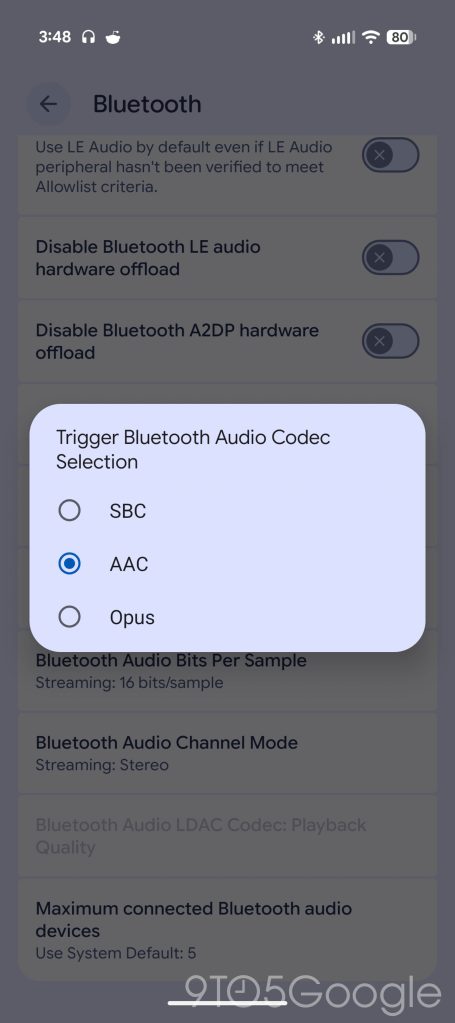
- Select the Codec: Here, you will see a list of available codecs. If you have compatible hardware connected, you can select LHDC.
- Configure Sample Rate: Within the same menu, you can manually select the 24-bit/192kHz sample rate if your hardware and streaming service support it.
A common frustration is fixing lhdc codec grayed out on pixel phone. If the option is grayed out, it almost always means the phone does not detect an LHDC-certified device at the other end of the Bluetooth connection. Ensure your earbuds are connected and that any "High-Quality Audio" toggles within the earbuds' own companion app (like Nothing X or HeyMelody) are switched to the "On" position.
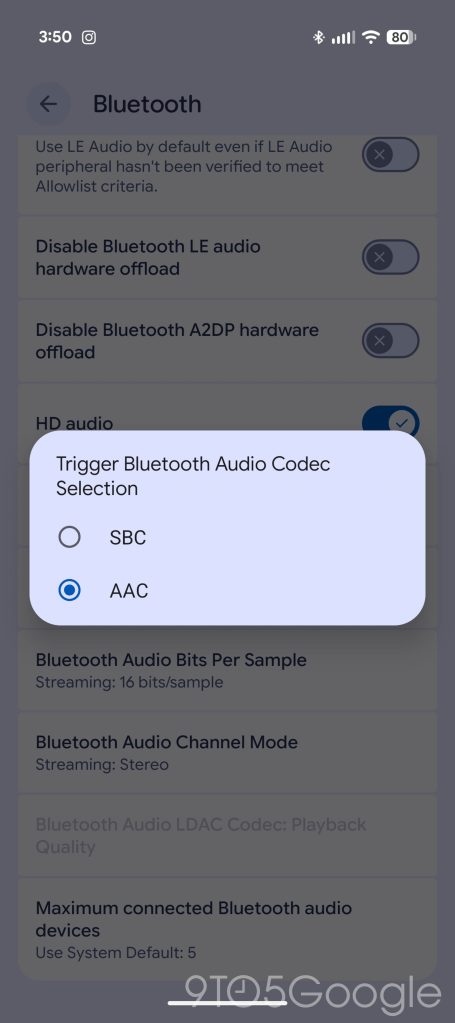
Pro Tip: Even if you have the codec selected, the bitrate might default to "Best Effort." In Developer Options, you can force the bitrate to its maximum setting for stationary listening. However, if you're walking through a city with lots of interference, leaving it on "Adaptive" or "Dynamic" is the better choice to prevent audio dropouts.
Summary: A New Era for Pixel Audio
For a long time, the Google Pixel was seen as a "software first" phone where the hardware and specific technical specs like audio codecs were secondary. With Android 17, that narrative has changed. By embracing the lhdc codec, Google has opened its doors to a wider ecosystem of high-end audio gear. You are no longer restricted to the company's proprietary ecosystem or Sony's LDAC to enjoy high-fidelity sound.
Whether you are a casual listener who wants the best possible sound from your Nothing Ear buds or a dedicated audiophile chasing 24-bit/192kHz perfection, this update is a game-changer. The Pixel has officially earned its place in the pockets of music lovers everywhere.
FAQ
Is LHDC better than LDAC?
Technically, LHDC v5 offers a slightly higher maximum bitrate of 1Mbps compared to LDAC's 990kbps and provides a significantly better low-latency mode for gaming. However, both are excellent, and the "better" choice often depends on which codec your specific earbuds support better.
Which phones support the LHDC codec?
With the update to Android 17, the Google Pixel 6 and all subsequent models (Pixel 7, 8, and 9 series) now offer native support. Many flagship phones from OnePlus, Xiaomi, and Oppo also support the format.
Is LHDC worth it for music?
Yes, especially if you use high-resolution streaming services like Tidal, Qobuz, or Amazon Music HD. The higher bitrate allows more data to reach your ears, resulting in better clarity, more accurate instrument separation, and a more immersive soundstage.
Is LHDC 5.0 lossless?
While it is technically "lossy" because it uses compression to fit through the Bluetooth bandwidth, LHDC 5.0 is considered "near-lossless." It can transmit audio with enough detail that it is virtually indistinguishable from a wired connection for most listeners.
Which is better LHDC or LDAC?
LHDC is often preferred by gamers and video viewers due to its 30ms ultra-low latency mode. LDAC is more widely supported across a larger range of premium headphones (like Sony and Sennheiser). For pure sound quality on a Pixel, LHDC v5's higher stability in congested areas gives it a slight edge.