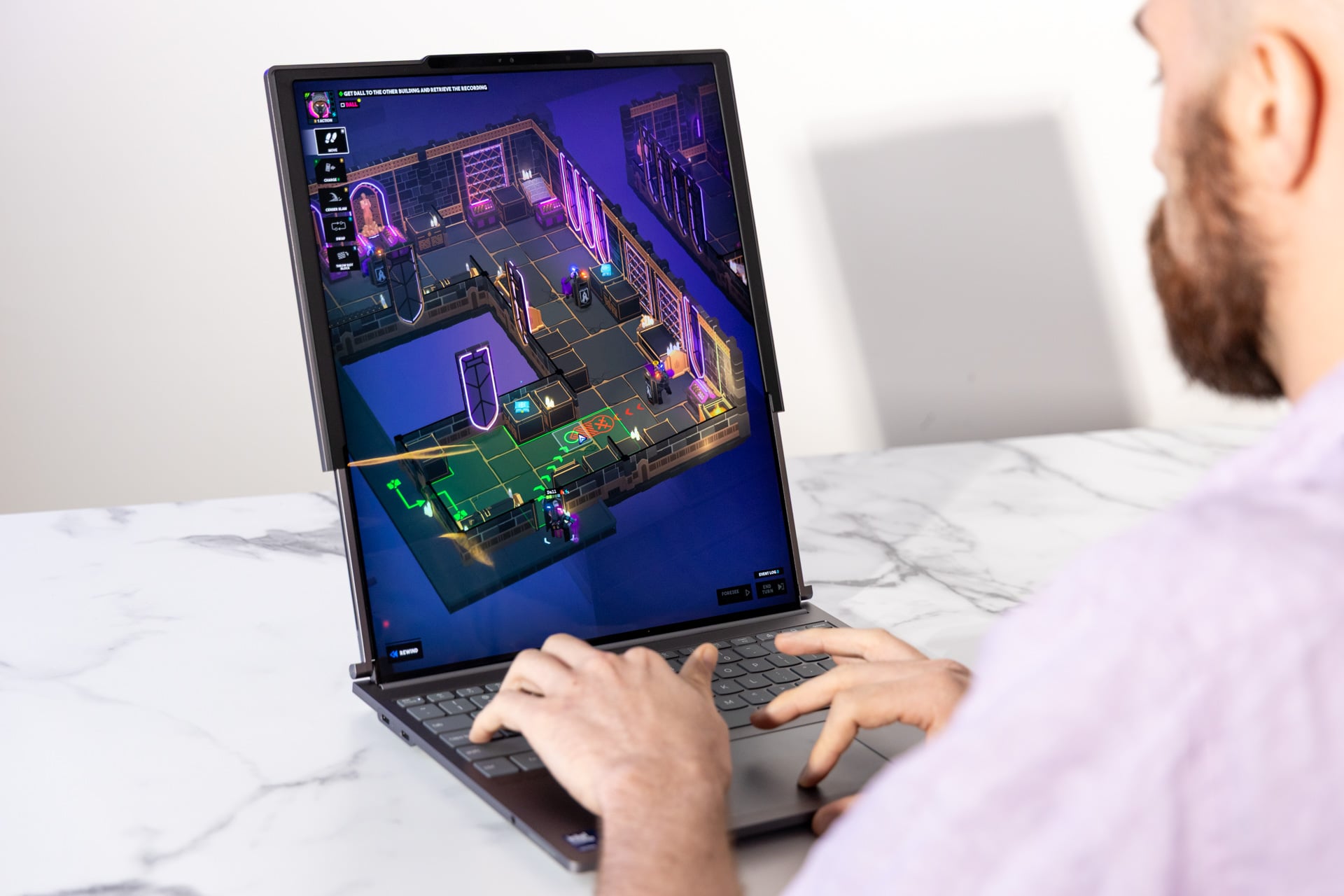
With a mechanical whir that sounds like a subtle glimpse into the next decade of personal computing, the Lenovo ThinkBook Plus Gen 6 begins its transformation. At the touch of a button, the display doesn't just fold or flip—it ascends. What begins as a standard 14-inch productivity machine smoothly elongates into a massive 16.7-inch vertical canvas.
The central question for the modern professional is no longer whether we can engineer such a device, but whether we should pay $3,299 for it. As someone who has spent the better part of a decade evaluating premium hardware for the global traveler and executive, I approach this machine with a mixture of technical awe and pragmatic skepticism. Lenovo has a history of experimental "Plus" models—using E-Ink or secondary screens—but the Gen 6 is their most ambitious play yet. It promises the utility of a dual-monitor setup in a form factor that fits into a standard briefcase.
Pros & Cons
| Pros | Cons |
|---|---|
| Vertical Real Estate: Nearly 50% increase in screen area. | Battery Life: Limited to ~5.5 hours in extended mode. |
| Innovative Engineering: Smooth, motorized rollable mechanism. | Price Point: $3,299 is a significant early-adopter tax. |
| Premium Build: Sturdy aluminum chassis and haptic trackpad. | Tilt Limitation: Screen only tilts to 110° to prevent tipping. |
| Software Intelligence: Auto-resizing windows via ThinkBook Workspace. | Mechanical Risk: Long-term durability of motors remains unproven. |
The Star of the Show: The Motorized Rollable OLED
The centerpiece of this device is undoubtedly the flexible OLED panel. Unlike foldables, which often suffer from a visible crease and require manual manipulation, the ThinkBook Plus Gen 6 utilizes a motorized system to unroll the display from within the base. In its compact state, you have a 14-inch screen with a 5:4 aspect ratio—already more vertically oriented than the standard 16:10.
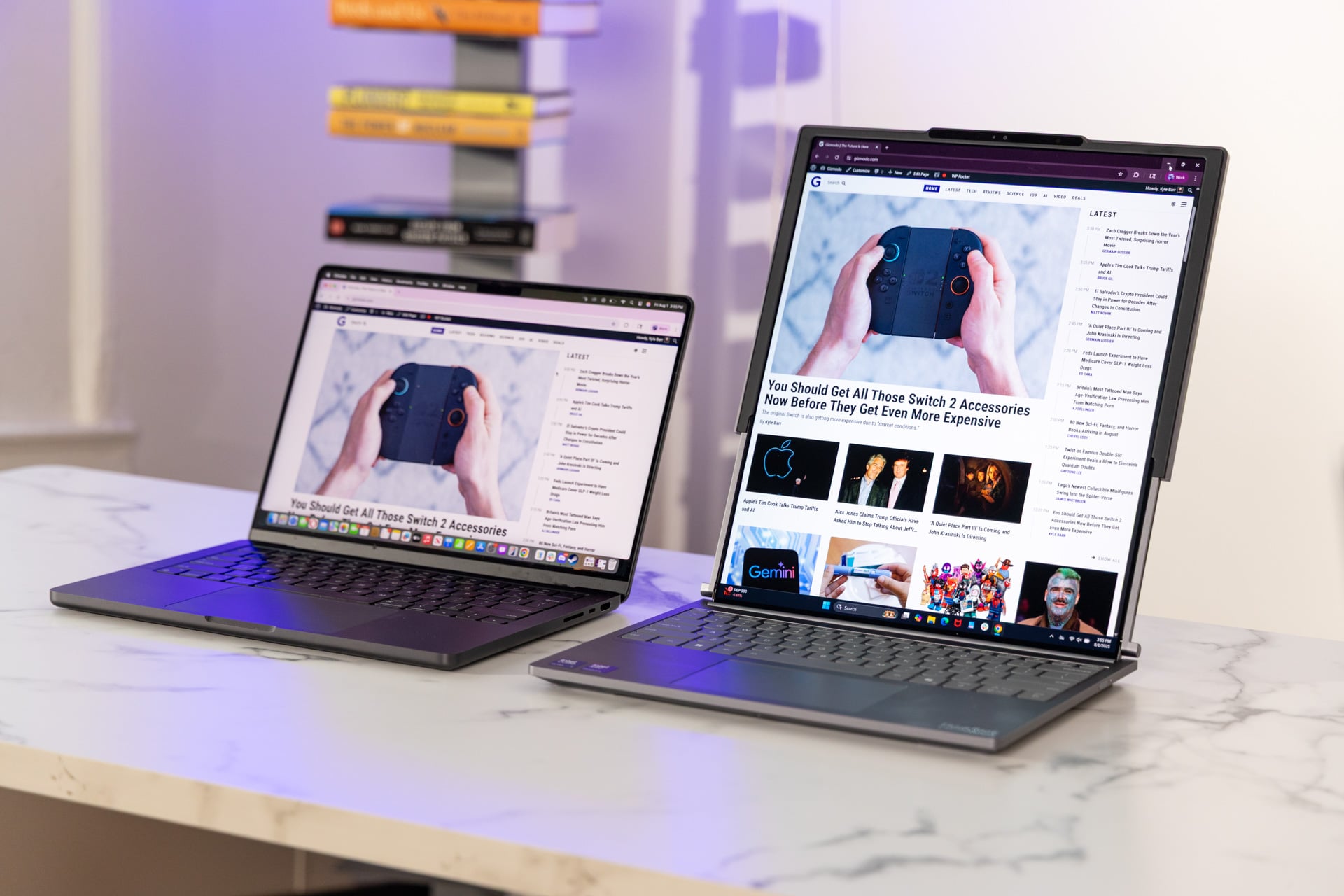
When the motor engages, the screen real estate increases by nearly 50%, reaching a height of 16.7 inches with an 8:9 aspect ratio. For those who deal in long-form data, complex code, or extensive legal documents, this verticality is a revelation.
Expert Insight: The transition isn't just about size; it's about resolution density. At full extension, you are working with a 2000 x 2350 resolution. The OLED technology ensures inky blacks and vibrant color accuracy, supporting Dolby Vision HDR, making it as much a creative tool as a productivity one.
| Feature | Compact Mode (14") | Extended Mode (16.7") |
|---|---|---|
| Aspect Ratio | 5:4 | 8:9 |
| Resolution | 2000 x 2000 (equiv.) | 2000 x 2350 |
| Screen Area | ~96 sq. in. | ~140 sq. in. |
| Primary Use | Standard Laptop Tasks | Coding, Spreadsheets, Writing |
Design, Portability, and Durability Concerns
From an engineering perspective, the ThinkBook Plus Gen 6 is a marvel of weight distribution. Despite housing the motors and the extra screen material in the "chin" of the device, it weighs in at just 3.72 pounds and measures 0.78 inches thick. To put that in perspective, this setup weighs up to 60% less than carrying a high-end laptop plus a standalone 24-inch travel monitor, yet it provides nearly the same vertical viewing height.
However, the laws of physics cannot be entirely subverted. Because the screen becomes top-heavy when fully extended, Lenovo has limited the hinge tilt to 110 degrees. If you try to push it further, a built-in "buzzer" warning system alerts you that the device is at risk of tipping. For the traveler who likes to work with a laptop on their lap in a lounge or on a plane, this limited tilt might be a dealbreaker.
The build quality feels exceptionally rigid, utilizing premium materials to protect the delicate rolling mechanism. But the question of longevity persists: How many "rolls" can this motor handle over a three-year enterprise lifecycle? Lenovo suggests it is built for thousands of cycles, but for a $3,299 investment, one expects a decade of reliability.
Performance and Software: Beneath the Surface
Under the hood, Lenovo hasn't skimped on the internals. The Gen 6 is powered by the Intel Core Ultra 7 258V processor, supported by 32GB of LPDDR5X RAM and a 1TB SSD. This is a formidable "Lunar Lake" configuration designed for efficiency and AI-enhanced tasks.
The real challenge for rollable tech is the software. Windows 11 isn't natively designed for screens that change size while in use. To bridge this gap, Lenovo introduced "ThinkBook Workspace." This proprietary overlay manages window snapping, provides custom widgets for the extended area, and includes a "Smart Copy" clipboard tool. In practice, the software is clever but not yet flawless; early testing reveals occasional stutters as the OS tries to recalculate window positions during the 5-second expansion process.
The physical interaction points—the keyboard and trackpad—remain high points. The haptic trackpad offers a satisfying, crisp pop that mimics a mechanical click without the travel, and the keyboard maintains the tactile 1.5mm travel that has made the ThinkBook and ThinkPad lines the gold standard for writers.
The Trade-offs: Battery Life and Productivity Realities
As a travel critic, I often look for the "all-day" battery mark. The ThinkBook Plus Gen 6 struggles here. When the screen is fully extended and the OLED is pushing 2350 vertical pixels, the battery life hovers around 5.5 hours. For an international flight or a long day of meetings without a power outlet, this is a significant limitation. You are essentially trading three hours of runtime for that extra vertical space.
Furthermore, the I/O is somewhat sparse due to the internal space occupied by the rolling mechanism. You get two Thunderbolt 4 ports, but the need for a docking station is almost guaranteed if you are a power user.
Value Verdict: Who Should Buy the ThinkBook Plus Gen 6?
At $3,299, the ThinkBook Plus Gen 6 is not a mass-market device. It sits in a rarefied air alongside the $5,000 HP Spectre Fold. While the Spectre offers a larger overall canvas, the Lenovo is significantly more portable and offers a more "stable" laptop experience.
This device is for:
- The Finance Professional: Who needs to see 100+ rows of an Excel sheet without scrolling.
- The Developer: Who wants a dedicated vertical terminal window that doesn't require a second monitor.
- The Executive Traveler: Who demands the cutting edge of "cool factor" but still needs a functional, high-performance machine for the boardroom.
For the average user, a high-quality 16-inch laptop like the ThinkPad X1 Carbon or a MacBook Pro provides better battery life and more traditional ergonomics at a lower price. But for the "early adopter" who views vertical space as the ultimate luxury, the ThinkBook Plus Gen 6 is a fascinating, high-functioning glimpse into the future of the mobile office.
Check Price and Availability at Lenovo →
FAQ
How long does it take for the screen to fully extend? The motorized mechanism takes approximately 4.5 to 5.5 seconds to transition from the 14-inch compact mode to the full 16.7-inch extended mode.
Is the screen durable enough for everyday travel? The display is protected by a specialized flexible coating, but like all foldables and rollables, it is more susceptible to punctures than traditional glass. However, because it rolls into the base when closed, the most sensitive parts are protected during transit.
Does the screen wobble when fully extended? Surprisingly, no. Lenovo has implemented a rigid support structure that rises with the screen. While there is a slight flex if you press firmly on the top, it remains stable during standard typing and touch interactions.
Are you ready to trade battery life for vertical space? If your workflow demands seeing more at once, the ThinkBook Plus Gen 6 might be the most important upgrade of the year. For more deep dives into the latest in travel-ready tech, subscribe to our newsletter below.