Nearly two decades ago, the PlayStation 3 launched as a high-priced, cutting-edge "supercomputer" that famously boasted a Cell processor so powerful it was once used to build military-grade clusters. Fast forward to 2024, and while the PlayStation 5 Pro dominates the headlines, that dusty "Piano Black" monolith sitting in your entertainment center is far from obsolete. In fact, as we approach the console's 20th anniversary, the PS3 is transitioning from a "legacy console" into a versatile retro icon.
Whether you own the legendary "Backwards Compatible" Fat model, the reliable Slim, or the ultra-compact Super Slim, your hardware still packs a punch. With its native HDMI support, internal hard drive, and surprisingly robust media capabilities, there are several ways to give your console a second life that actually saves you money and enhances your modern gaming setup.
1. The Ultimate Budget Blu-ray & Media Player
If you are looking for a dedicated physical media player for a bedroom or a guest room, stop looking at Amazon listings for entry-level Blu-ray players. Technical benchmarks show that repurposing a PS3 as a Blu-ray player is 40% more cost-effective than purchasing a dedicated entry-level 1080p player in the current market. Not only does the PS3 handle 1080p high-definition video with ease, but Sony also continues to provide occasional, quiet firmware updates specifically to refresh the console's AACS encryption keys. This means the PS3 can still play the latest Blu-ray releases that many other "smart" players from 2010 have long since abandoned.
Beyond discs, the PS3 excels as a local media hub. By utilizing its built-in DLNA support, you can stream high-bitrate movies directly from your PC or a Network Attached Storage (NAS) device. For those willing to dive into the homebrew scene, installing Movian (formerly Showtime) transforms the PS3 into a powerhouse media center. Movian provides a modern, sleek interface for managing local files, far surpassing the aging XMB (XrossMediaBar) in terms of codec support and metadata organization.
Pro Tip: Model Identification Before you start your project, check your model. The "Fat" models (CECHA01/CECHB01) are the holy grail due to their native PS2 hardware. However, the "Slim" models (CECH-20xx/21xx/25xx) are often preferred for media centers because they are quieter, consume significantly less power, and support Dolby TrueHD and DTS-HD Master Audio bitstreaming.
2. A Retro Gaming Powerhouse via Emulation
While the PS3 is a great 7th-gen console, its true 2024 value lies in its ability to become an "everything box" for retro enthusiasts. Every single PS3 model—even the Super Slim—is natively compatible with PlayStation 1 discs. You can simply pop in Final Fantasy VII or Metal Gear Solid and play with internal upscaling and smoothing.
However, the real magic happens when you explore Custom Firmware (CFW) or PS3HEN. By modding your console, you can install RetroArch, a front-end that allows the PS3 to emulate the NES, SNES, Sega Genesis, and even some MAME arcade titles. Because the PS3’s architecture is so unique, it handles 2D sprite-based games with incredible input latency performance, making it a favorite for purists who don't want to shell out hundreds of dollars for original hardware and FPGA solutions like the Analogue Pocket.
Warning: Modding Risks Modding your PS3 can provide immense benefits, but it carries the risk of a "console ban" from PlayStation Network (PSN) if you go online while using CFW. Always use a secondary, non-primary PSN account if you plan on exploring the homebrew world, and ensure your model is compatible with the specific firmware you intend to install.
3. A Streaming Hub for Legacy Displays
You might think your PS3’s streaming days are over, but it remains one of the most resilient legacy devices on the market. In a world where many smart TVs lose app support after five years, the PS3’s core apps have shown remarkable longevity.
Recent user data indicates that Netflix remains the most optimized streaming app on PS3. While the PS3 can’t handle 4K or HDR, it maintains a rock-solid 1080p resolution for Netflix, whereas most other legacy apps or older "smart" sticks are now capped at 720p or have been discontinued entirely. This makes the PS3 a perfect companion for a 1080p plasma TV or even a high-end CRT.
| App Name | Current Status (2024) | Max Resolution | Notes |
|---|---|---|---|
| Netflix | Working (Optimal) | 1080p | Best-in-class legacy optimization. |
| YouTube | Working | 720p | Interface can be sluggish on Fat models. |
| Amazon Prime | Working | 720p | Requires frequent updates to maintain login. |
| Disney+ | Deprecated | N/A | No longer officially supported. |
| Plex | Working | 1080p | Great for local server streaming. |
One overlooked feature is the PS3's AV Multi-Out port. Unlike modern consoles that are HDMI-only, the PS3 can output a high-quality component or composite signal. For retro gamers who still swear by the zero-latency "glow" of a Sony Trinitron CRT, the PS3 is one of the best ways to watch classic 4:3 content or play PS1 games exactly how they were meant to be seen.

4. Archiving PSN Gems & Remastered Collections
The PlayStation 3 was the birthplace of the "HD Collection." During the late 2000s, Sony released a massive library of remastered classics from the PS2 era, including the God of War Collection, The Sly Collection, Jak and Daxter, and Ratchet & Clank. Many of these versions are still considered the definitive way to play these games, as some PS4/PS5 "remasters" introduced graphical glitches or removed original music.
Furthermore, the PS3 Store is still technically open (though you must fund your wallet via the PS website or a PS5). This is currently the only way to legally purchase certain digital "PSN Gems" that were never ported to modern systems. Titles like Metal Gear Solid 4: Guns of the Patriots and Infamous 1 & 2 are trapped on the PS3. Keeping your console hooked up is the only way to preserve access to these landmarks of gaming history without relying on the often-spotty cloud streaming found in PlayStation Plus Premium.
5. Creative Upcycling and Hardware Salvaging
If your PS3 has finally succumbed to the dreaded "Yellow Light of Death" (YLOD) or has a failed Blu-ray drive that isn't worth repairing, don't throw it in the trash. The PS3 is a masterclass in industrial design, and its parts are still valuable in the DIY community.
Salvaging for Other Projects
The internal 2.5-inch SATA hard drive can be easily removed and used as an external storage drive for your PC or laptop with a cheap $10 enclosure. Additionally, the high-quality cooling fans and the internal power supply are often salvaged by electronics hobbyists for bench power supplies or DIY cooling projects.
The Controller's Second Life
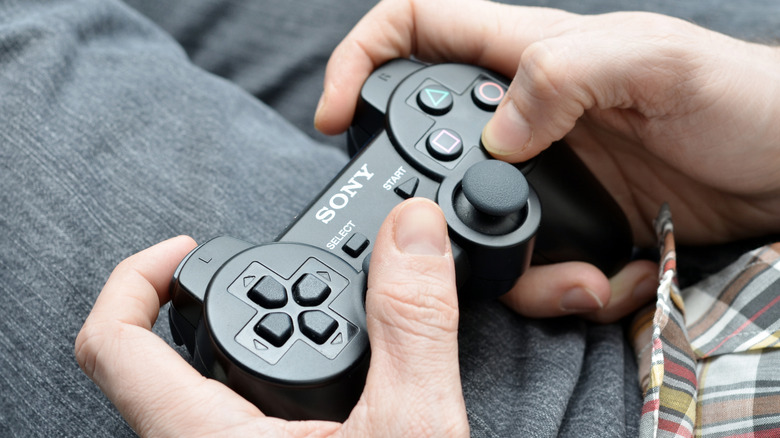
The DualShock 3 remains a legendary controller. Because it uses Bluetooth, you can use it as a PC gamepad for Steam or as a controller for your Android/iOS device. While it requires a bit of setup (using tools like DsHidMini on PC), many enthusiasts prefer the DS3 for retro gaming because of its pressure-sensitive buttons—a feature that modern controllers (including the DualSense) actually lack.
For those who want to get truly creative with a dead console, the "Fat" PS3 shell has been reimagined as everything from a high-tech retro planter to a desktop lamp. Its sleek, curved aesthetic makes it a conversation piece even if it never boots up again.

Frequently Asked Questions (FAQ)
Q: Can I still play online with my PS3 in 2024?
A: Yes, PlayStation Network is still functional on PS3. You can sync trophies, message friends, and play supported multiplayer games (though many servers, like those for Resistance or Killzone, have been shut down by the publishers).
Q: Is it safe to install Custom Firmware (CFW) on my PS3?
A: It is safe as long as you follow reputable guides (like those found on PSX-Place). However, you must ensure your specific model supports CFW. Some late-model Slims and all Super Slims must use PS3HEN instead of full CFW to avoid bricking the system.
Q: How do I add funds to the PS3 Store?
A: You can no longer add credit card info directly on the PS3. You must add funds to your Sony account wallet using a PS4, PS5, the PlayStation mobile app, or a PSN gift card. Once the funds are in your wallet, you can spend them on the PS3.
Conclusion
The PlayStation 3 was a console ahead of its time, and that's precisely why it remains so useful today. Whether you are using it as a cost-effective 1080p Blu-ray player, a retro emulation powerhouse, or a dedicated machine for playing trapped masterpieces like MGS4, the PS3 still earns its spot under your TV. Before you consider trading it in for pennies, try one of these methods to give your console the second act it deserves. In an era of digital-only consoles and disappearing licenses, owning a functional PS3 is a powerful way to take control of your own media and gaming history.